
To be honest, I kinda' lost interest in Blogging in the last few months. I thought: "maybe that time has come"; I'll leave Blogging behind in exchange for a new adventure and just bring with me sweet memories of my blogging years and when I was once known as The Beauty Junkee.
But then I realized I just needed a new layout so I contacted Deann Sarmiento, a talented Blogger/Web Designer, to breathe new life into my blog and she delivered.

Some new improvements on my blog:
1. Less clutter, cleaner design
2. Quick loading time
3. Responsive
4. Cleaner fonts
5. Brighter design
6. More interactive
7. Mobile and iPad- ready
As I'm typing this, I just realized, the layout hasn't been improved-it has been completely changed so this quick tour of The Beauty Junkee layout ver. 5.0 is very much needed.

So let's start at the topmost portion of the blog: There's a navigation bar that will follow you all the way to the bottom when you scroll downwards. Don't worry, you won't realize that it's following you and it won't interrupt your reading pleasure.
The navigation bar contains pages with information about me, this blog, disclaimer, rules, features, services, and top blog labels. Also, it contains buttons to my social media accounts. To those who are asking if I have RSS, I have no idea what that is, but I already have it. LOL.
The magnifying glass icon is my search bar. It follows you anywhere on the blog so anytime you think about researching something on my blog, it will be at your beg and call.


Don't forget to share my blog posts on these following social media platforms: Facebook, Twitter, Google+, StumbleUpon, Tumblr, Linkedin, and Pinterest.
I put links in some texts most especially if I'm mentioning a product or I say CLICK HERE. Just hover over the words and if the hand cursor shows, just click! ;)

At the bottom of each blog posts, you will find RELATED ARTICLES aka LinkWithin. It is now improved because instead of offering just 3 related articles, it offers about 6 or 7. Scroll left and right to choose from the suggested related articles or just watch it 'carousel' from left to right on its own.

My comment box does not pop up separately from the blog post anymore. Instead, it is embedded as a section in each blog post. Just click the blog post that you wanna comment on and scroll downwards to read comments and to find the comment box.
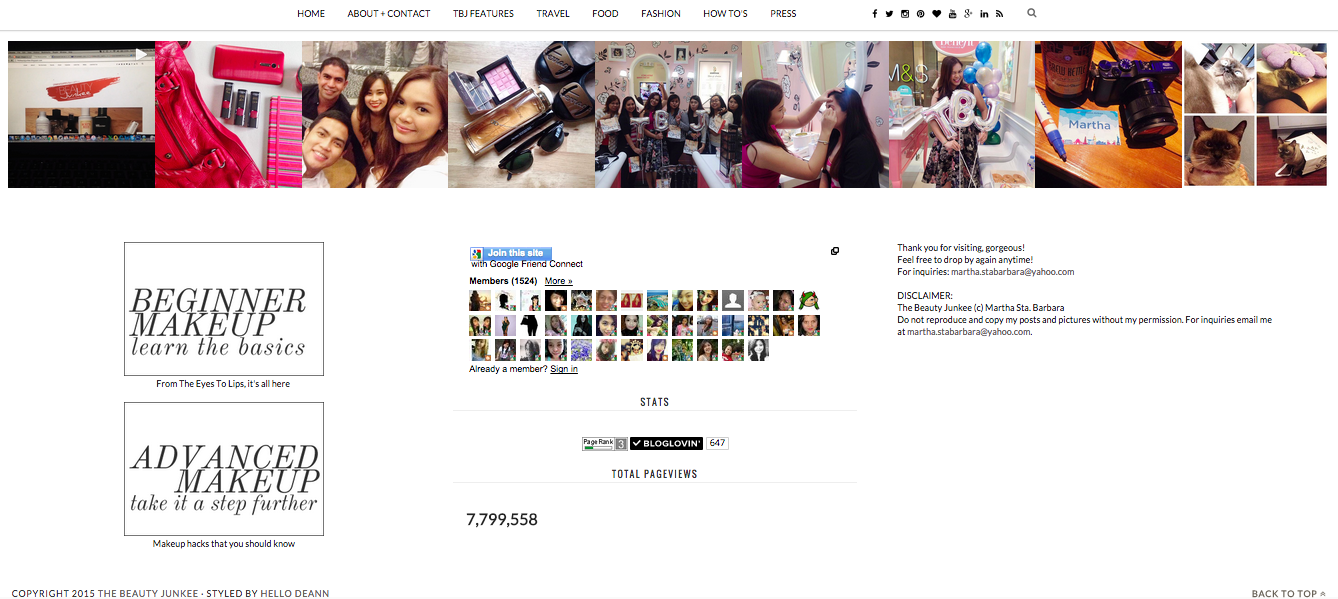
The footer features my Instagram slider, links to my BEGINNER MAKEUP and ADVANCED MAKEUP tutorials lists, Blog stats, Bloglovin' auto- follow button, Google Connect, and my disclaimer.
For the sidebar, you will find there the ASK TBJ FORM, Labels, Blog Archive, Promos, FeedBurner (to get TBJ straight to your digital mailbox), ad spaces, and Top Stories.
That's all. I've a newfound love for Blogging because of this layout!
Please let me know what you think about the layout. If you're also encountering some issues with it, please let me know as well. Be sure to check my blog on your smartphones and tablets! ;)


18 Comments
I like the design! :) and I can easily find the comment box :D
ReplyDeleteI panicked a little when you said you wanted to quit blogging! It would be sad if you were to stop blogging but if that's what makes you happy, go for it. But know that your readers will surely miss you! For now, I am enjoying every blog you post!
ReplyDeleteThis blog post is really fantastic. I agree. Less clutter and most of all, mobile-friendly! Yassss! Looking forward to new blog posts just got a lot better. Woohoo! Thanks for this post. :)
I love your new layout Ms. Martha! I can easily search for reviews of brands because that's the first thing I do when I hear about a brand and want to purchase it -- I want to know what you think of it, if it's worth the price etc. Also, I can now read your blog via Feedly, hurray! :)
ReplyDeletehI Ms. Martha!I really like the new blog layout of yours.Really noticed the lost of the laggy effect when browsing through the blog posts.Pretty neat,actually.Congratulations!And by the way please do not stop blogging because I often look forward to reading your posts especially during times when I want information about my beauty interests,hehe..Not only that I enjoyed reading your escapades/trips to various locations that I cannot personally reach due to my schedule.As I have said through my comments, my desire to visit some locations you have featured on the blog is stronger than ever thanks to you.Just for now though,I'll be contented with your features.Thanks so much.P.S. i can relate much with the fluctuation of interest in the things/hobbies I also love to do.But you'll be back on track again I hope because we readers are looking forward to your insights.Good day!
ReplyDeleteLove the new layout! It looks sleek!!
ReplyDeleteI'm so happy for you Ms. Martha. Please don't quit blogging because you are an inspiration to a lot of makeup enthusiasts... Your new layout is very nice :D
ReplyDeleteI hope you don't stop blogging. I'm looking for many years on your blog post. I love everything on your new layout. I was busy scrolling everything. Hehe. Congrats on this awesome layout!
ReplyDeleteI find this new layout more reader-friendly :D The white background looks super clean :)
ReplyDeleteAnd when I posted that comment about the comment box, the comment box down here wouldn't load XD Now it's working alright :)
Sleek new layout! :)
ReplyDeleteIn Transit PH #BigBirthdayGiveaway
quit blogging?NOOOOOOOO!it won't be the same without you Ms. Martha :) so please don't ever quit.hehe. as for the layout design, i think i could say in behalf of all your readers that we all LOVE it! this actually makes me wanna revamp my blog design which Dean also made for me. she's just the best. i actually thought that you migrated to wordpress because of how the design was done. but about that, have you ever thought of transferring to wordpress? what are your thoughts about it?
ReplyDeletemuch love from www.pinayontheloose.com
Cool layout Miss Martha! One feedback is the comment box though, I cannot type immediately on the box because social media icons pop up. I'm using an Iphone as I type this. Please write more helpful articles by the way! :)
ReplyDeleteits prettier than ever! it's neat!!! i love this kind of layout ms martha! oh please ms m don't quit blogging =( i can't wait to see more on your blog.. (advices, ideas and more)
ReplyDeletemy favorite part: the font! (and yes it is really pleasant to my eyes -- for having a poor eyesight reader like me hehe)
no more separate link for the comment portion!
hugs!
Loving the new lay out! Though I need some time to be familiar with where the links and other stuff are. It looks minimalist, clean and fresh!
ReplyDeleteThank you for the feedbacks, Ladies. Appreciate them so much! :) Enjoy reading! :D
ReplyDeleteThe new layout is cleaner and more sleek. :) And what I love the most is it's easier to comment. I find it hard to comment before because when my connection is slow, the captcha couldn't be retrieved or the comment couldn't be posted. So yes, I love your new layout! The fonts are more readable too.
ReplyDeleteHi Martha, I love the whole layout as well. Is there any chance you can have smoother scrolling? It kinda feels "heavy" to scroll down. I also think that your font size on your content is too big. I think it would be better to have a smaller one though, size 11 or 12.
ReplyDeleteOn another note, don't even think about quitting blogging. I have been a silent reader on all your blog posts and you've me helped me tremendously especially in skincare. Congratulations on this upgrade!
Hi Tin,
ReplyDeleteThank you for your comment! The 'rough' scrolling, I believe, is due to the size of the photos and the best I did was to scale them down to minimize this issue. Sometimes, this issue is due to slow internet connections as well and perhaps due to Blogger's system limitations. :) For the font size, I raised this issue to the designer too and she told me that this is the standard for her template, thus I can't do much about it. My designer updates her template every 6 months though. I'll inquire by then and have these issues fixed.
Thank you for being an avid reader. I really appreciate it. I hope you won't stop supporting The Beauty Junkee. :)
atleast now, i would able to commentna,before kasi hindi. Good layout and more neat.
ReplyDeleteLet me know what you think of this post! :)